









































How to Fix “Cannot Load Library logprint.dll” Error on Windows
- Support
- Software Tutorials
- Kate
 1167
1167- 2026-03-10 18:28:20


If your game fails to launch and displays the error message “Cannot load library logprint.dll”, this usually indicates a missing or corrupted runtime dependency rather than a problem with the game itself. This issue commonly occurs after running a game localization tool, patch, or mod, and it can prevent the game from starting properly. In this guide, we’ll explain what causes the logprint.dll error and how to fix it using safe and reliable methods.
What Is logprint.dll and Why This Error Happens
The logprint.dll file is not a native Windows system file. Instead, it is included in the Microsoft Visual C++ 2013 Redistributable package. When a game or its related tools rely on this runtime and it is missing, outdated, or corrupted, Windows cannot load the required library and throws an error.
This problem is especially common in the following situations:
The Visual C++ 2013 runtime was never installed
The runtime was partially removed or corrupted
A localization or crack tool depends on VC++ 2013, but the system lacks it
How to Fix “Cannot Load Library logprint.dll” Error When Launching Games
Step 1. Launch Auto DLL Fixer and go to the “Runtime Library Install” to check whether Microsoft Visual C++ 2013 Redistributable is installed on your computer.
Step 2. If it shows not installed, click on the “High-speed download” and complete the installation.
Step 3. Once finished, restart your system to ensure the runtime is properly registered, then try launching the game again. In many cases, this immediately resolves the logprint.dll error.
Step 4. If Visual C++ 2013 is already installed but the error persists, the runtime installation may be damaged. In this situation, download the VC++ 2013 installer again, run it, and select the “Repair” option.
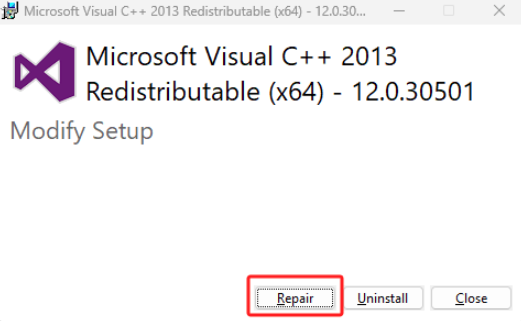
Step 5. After the repair process completes, reboot your PC and relaunch the game to check whether the issue has been fixed.
Important Tips to Avoid Further DLL Errors
Manually downloading DLL files from third-party websites is not recommended, as it can lead to compatibility issues or security risks. Always resolve DLL errors by installing or repairing the correct runtime libraries. If you frequently encounter DLL-related errors across different games or applications, using Auto DLL Fixer can help scan your system, identify missing dependencies, and reduce repetitive troubleshooting.







