










































How to Fix xinput1_4.dll Error (Error Code 126) on Windows 7
- Support
- Software Tutorials
- Kate
 1554
1554- 2026-03-10 18:27:11


If you are trying to run a modern game on Windows 7, you may encounter the infamous xinput1_4.dll error (Error Code 126). This error prevents the game from launching and can be frustrating, especially since xinput1_4.dll is designed for newer versions of Windows. In this guide, we explain why this error occurs and provide a reliable workaround for Windows 7 users.
Why xinput1_4.dll Causes Errors on Windows 7
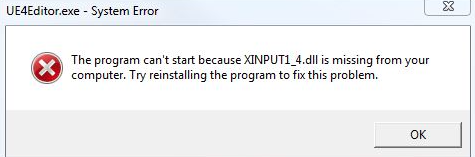
The xinput1_4.dll file is part of newer DirectX components introduced alongside Windows 10 and DirectX 12. Since Windows 7 does not natively include this DLL, any game or application expecting it will fail to start, showing messages like:
“The program can’t start because xinput1_4.dll is missing from your computer.”
Understanding this limitation is key: Windows 7 cannot fully support xinput1_4.dll, so the solution focuses on bypassing the DLL check rather than providing the full functionality.
How to Fix xinput1_4.dll Error on Windows 7
This workaround does not add native xinput1_4.dll functionality. It simply tricks the application into detecting a compatible DLL.
Step 1. First, navigate to C:\Windows\System32 and locate the file xinput1_3.dll. Copy this file to your desktop and rename the copied file to xinput1_4.dll.
Step 2. Once renamed, move it back into the System32 folder.
Step 3. Repeat the same procedure in C:\Windows\SysWOW64. Locate xinput1_3.dll, copy it to your desktop, rename it to xinput1_4.dll.
Step 4. Move it back into the SysWOW64 folder. Now, your game should be able to bypass the xinput1_4.dll error and launch successfully on Windows 7.
Additional Tips to Fix xinput1_4.dll Error
This method only works for games that can function with xinput1_3.dll. Some newer games may still require full DirectX 12 support.
If you encounter further DLL errors, consider using a DLL repair tool like Auto DLL Fixer, which can automatically detect and fix missing or corrupted DLL files.
Always back up your system before manually replacing DLL files to avoid unintended issues.
Conclusion
The xinput1_4.dll Error (Error Code 126) is a common obstacle for Windows 7 users running newer games, but it can usually be resolved with a careful workaround. By renaming and replacing xinput1_3.dll, or by using automated tools like Auto DLL Fixer, you can bypass the error and enjoy your games on older systems. For more solutions to fix system issues, you can pay attention to Kingshiper Software.







