










































How to Fix 0xc000007b Error on Windows
- Support
- Software Tutorials
- Kate
 1160
1160- 2026-03-10 19:31:42


The 0xc000007b error is a common Windows error that occurs when an application fails to start. This usually happens because of abnormal DLL file calls or missing system components. Users often have this issue when launching games, industrial software, or professional applications.
In most cases, the error message looks like this:
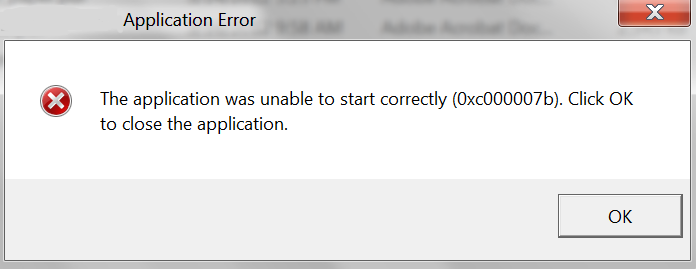
How to Fix 0xc000007b Error on Windows 7/8/10/11
The fastest way to fix the 0xc000007b error is to use a DLL fixer. With these tools, you can resolve about 80% of these issues by automatically fixing corrupted or missing DLL files, DirectX components, and Visual C++ libraries. However, if it does not solve the problem, continue reading to check for other possible causes.
Fix 1. Extraction Issues May Cause the 0xc000007b Error
Sometimes, the 0xc000007b error happens simply because the program wasn’t properly extracted.
For example, some inexperienced users might double-click a compressed file (like a ZIP or RAR) and try to run the .exe directly. This can trigger 0xc000007b.
Another common case is when the .exe itself is a self-extracting archive. If the system’s extraction component malfunctions, automatic extraction may fail, causing the error.
Solution: Manually extract the files using a reliable tool (like WinRAR or 7-Zip) before running the .exe. This bypasses the automatic extraction process and prevents 0xc000007b from appearing.
Tip: Make sure an extraction program is installed before attempting to extract .exe files manually.
Fix 2. Pirated Software or Cracked Patches Can Be Problematic
Pirated or cracked software often modifies original .exe or .dll files to bypass licensing restrictions. If the crack is buggy, it can trigger 0xc000007b on some systems. Official software has a lower chance of causing these errors. Cracked software, however, may fail due to improper modifications of system files.
Solution: Whenever possible, use legitimate software. For professional suites like Adobe, if you are using a cracked version, consider finding an alternative verified resource or switching to a licensed copy.
Fix 3. Virus-Infected Files
Another possible cause is malware infection. If an .exe file has been tampered with by a virus, it may fail to run and produce the 0xc000007b error. This is more likely if you see the same error in multiple programs.
Solution: Perform a full antivirus scan and replace the infected files with clean copies from a trusted source.
Fix 4. System Incompatibility
Some applications or games may simply not be compatible with your version of Windows. For example, running a game released after 2020 on Windows 7 may trigger 0xc000007b.
In this way, you need to check the game’s minimum OS requirements on the official website or on Steam. If the software requires Windows 10 or higher, it will not run properly on Windows 7, even if no error code is displayed.
Summary
You have learned how to fix the 0xc000007b error on Windows in this post. Following these tips can help you get your applications running smoothly. You should try the above solutions if you have this error and ensure your software comes from a trusted source.







