Multimedia Tools
Video Tools
Audio Tools

Image tools
Record and Edit Porfessional Videos on Mac
Windows Desktop Screen Recording Software
Easy and Fast Way to Compress Video and GIF
Screen Mirroring App for iPhone/Android/PC/Pad
All-in-one video toolkit that supports converting over 1000+ formats
Portable audio format converter, which supports common audio format conversion, multiple audio merging, audio compression, audio segmentation, and one click batch conversion of audio formats
Cut, copy, paste, insert audio, add effects and other editing functions, which can easily re edit the recorded audio files and make ringtones, adding a unique personality to your life.
Karaoke Maker and Vocal Extractor on Mac
Extract vocals and instrumentals from any audio and video track with the latest AI technology.
Best Voice Recording Software for All Windows Users
Convert Audio/Video to MP3/WAV/FLAC/OGG

Utilities
Office Utilities
Simple and powerful office solution for file compression, extraction, transferring, and sharing. Easily to process multiple files in seconds!
A powerful, simple and easy to operate PDF to word converter, which supports the conversion between PDF documents and multiple formats such as doc, ppt, pictures and txt documents; The software has the functions of fast conversion, batch conversion, high-quality identification, etc
Burn music, video, and data discs in one-click
Fast Way to Reduce Your File Size
The best and perfect tool to convert various ebook files with ease.
Convert Videos, Audios, Images, PDFs, and Word with Ease
Seamless Conversion for PDF to JPG & JPG to PDF
Shrink size of PDFs, images, and videos without losing quality
Extract & Manage & Compress Files in Seconds
System & Recovery
{{ postData.top_advertising_product.g_name }}
Converting high-definition M2TS video files into standard DVD discs can significantly improve playback compatibility and viewing experience on traditional DVD players. However, compared with converting common video formats, the M2TS-to-DVD process is more complex, as it involves high-resolution video encoding, audio stream synchronization, and DVD-specific structures that must be correctly preserved. This guide will walk you through how to convert M2TS to DVD without losing video quality or playback functionality.
Before converting and burning M2TS to DVD, it is recommended to complete the following preparations and checks:
TopBurn AI is a 100% safe DVD burning software for Windows. It lets you burn videos in M2TS, MTS, TS, and other formats to DVD discs using intelligent technology, keeping original quality without watermarks.
This DVD burner also allows you to create ISO images from video files or enhance video clarity with AI. For example, you can burn high-definition camcorder footage to a DVD or design custom menus to match your video themes. Additionally, it supports batch processing, letting you merge and burn multiple M2TS clips at once.
Follow the steps below to see how to convert and burn M2TS videos to DVD on your Windows PC within seconds.
To download the DVD burning and ripping program:
To burn M2TS to DVD on Windows PC:
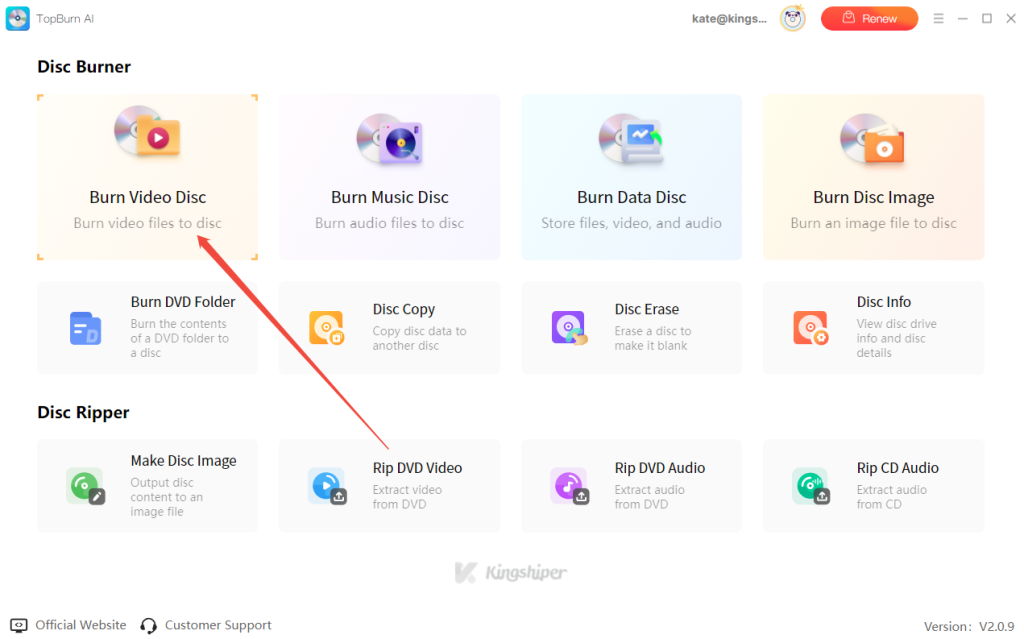
Step 1. Run TopBurn AI, select “Burn Video Disc”, and import your M2TS video files.

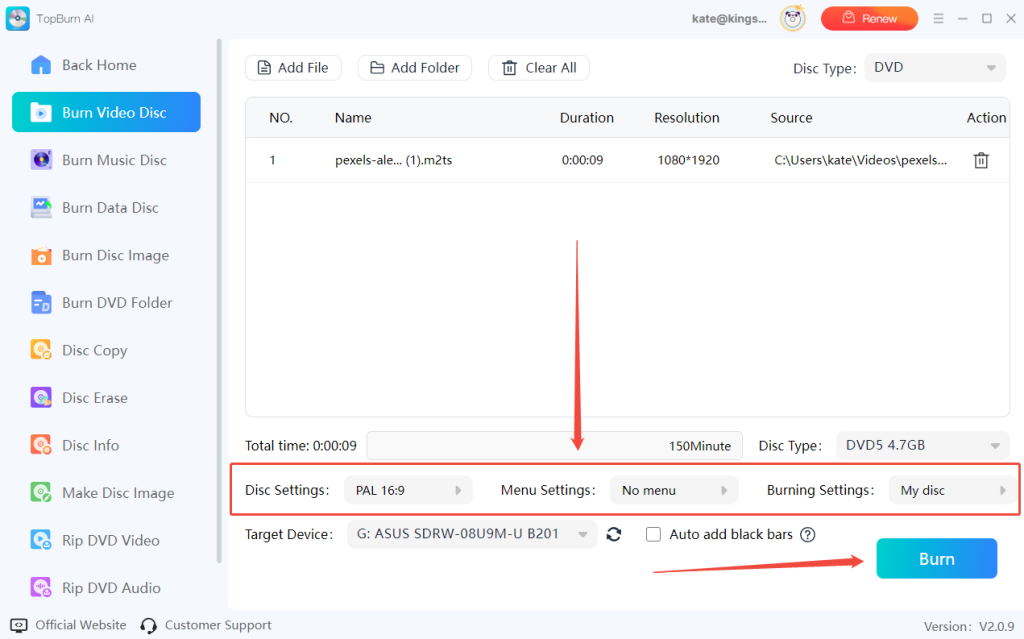
Step 2. Customize Disc Settings, Menu Settings, and Burning Settings, then click “Burn” to start the process.

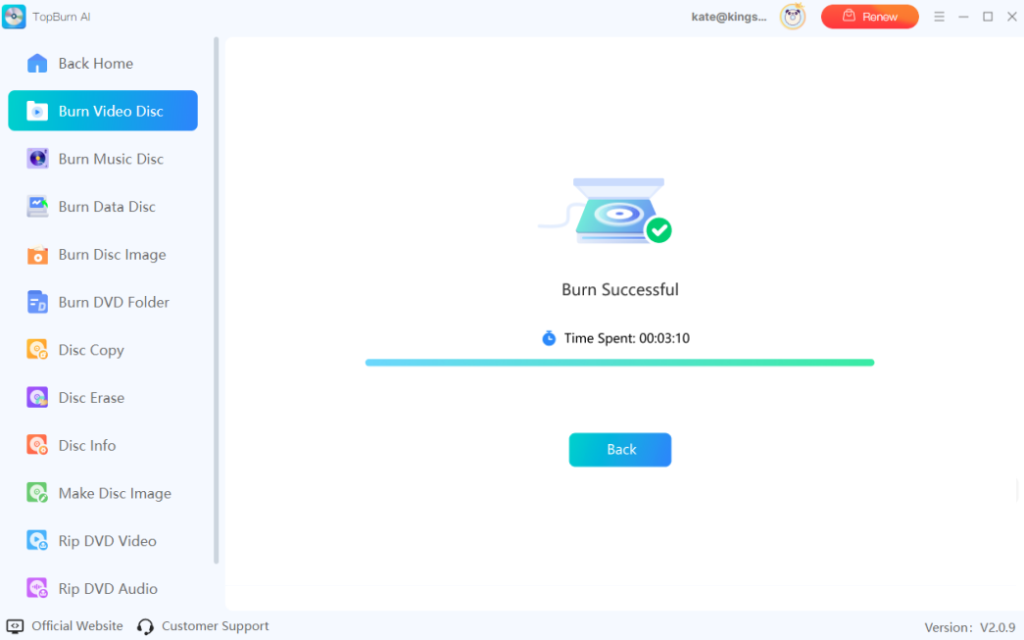
Step 3. Once burning is complete, you will see a "Burn Successful" message. You can now play the DVD on your computer or DVD player.

Disclaimer: Copying or burning copyrighted content for commercial purposes without permission is illegal. This guide is intended for personal use only.
Pro: Quick conversion without installing additional software.
Con: Cannot directly create a DVD disc; it only produces DVD-compatible video files.
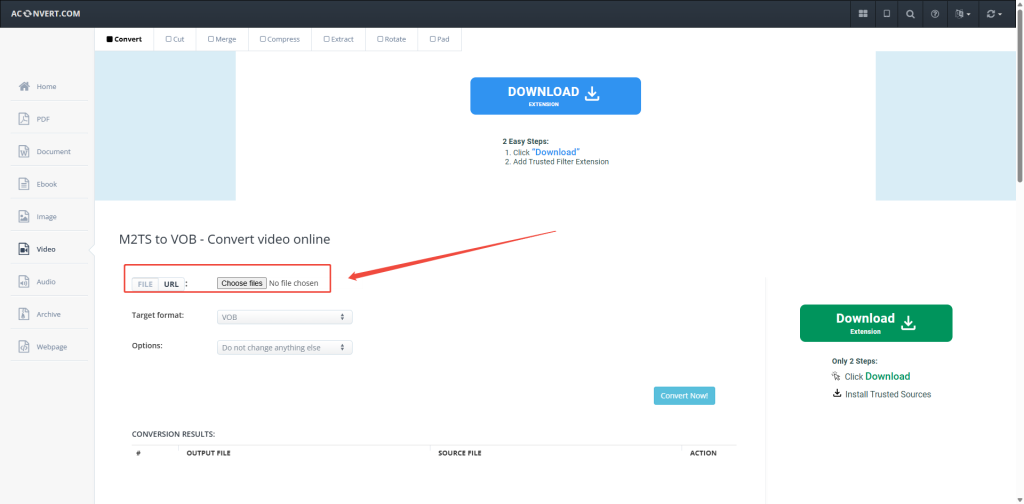
The online video converter is great for converting a video once or twice, but it isn’t ideal for frequent or large-scale conversions, as these websites often have file size limits or may stop working. If you want to give it a try, a recommended site is Aconvert.com. Please note that it’s best to enable an ad blocker before using it. Most online converters follow a similar process, as shown below:
Step 1. Click on the “Choose files” to upload your M2TS video file.

Step 2. Set the Target Format to “VOB” (DVD-compatible format).

Step 3. Click “Convert Now!” to start the conversion. After the conversion, you will get a VOB file, which can be burned to a DVD using DVD burning software to play on a standard DVD player.

Pro: Quickly burn videos directly within the software without complicated settings.
Con: Free version may include a watermark, and large files could be limited by DVD capacity.
Apart from the previous options, you can also create DVD discs using a general video converter. Most converters offer a free trial and allow you to burn videos while converting formats. They also support popular formats like MP4, AVI, MKV, and more.
If you want to try a video converter, Freemake Video Converter is a reliable choice. Here’s how it works:
Step 1. Go to the official Freemake website and click “Free Download” to install the software.
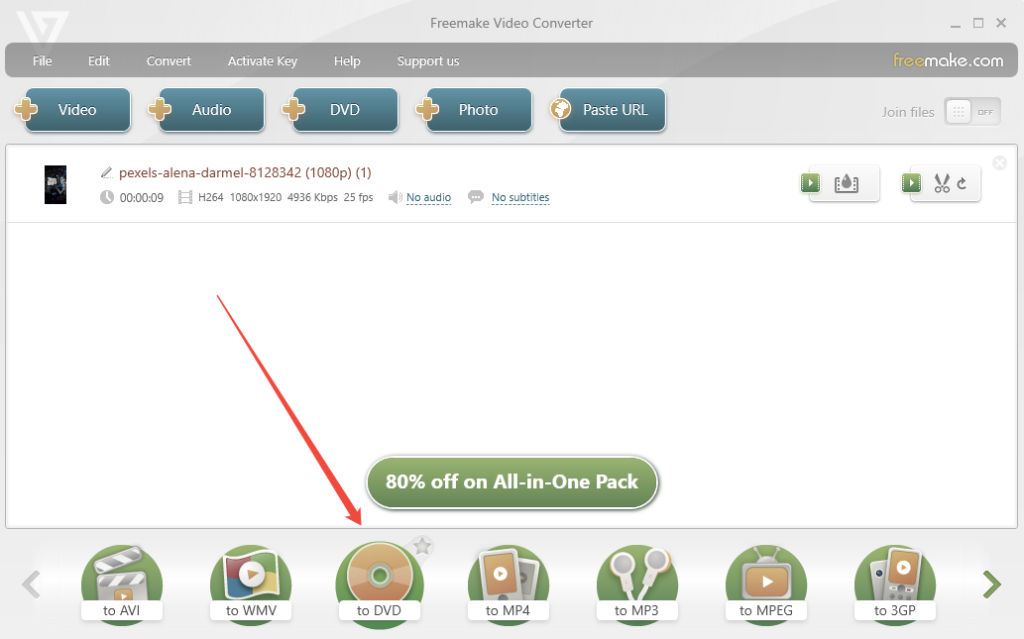
Step 2. Open the program, click on the “+ Video” icon to import the M2TS video.

Step 3. Find and choose the “to DVD” option at the bottom.

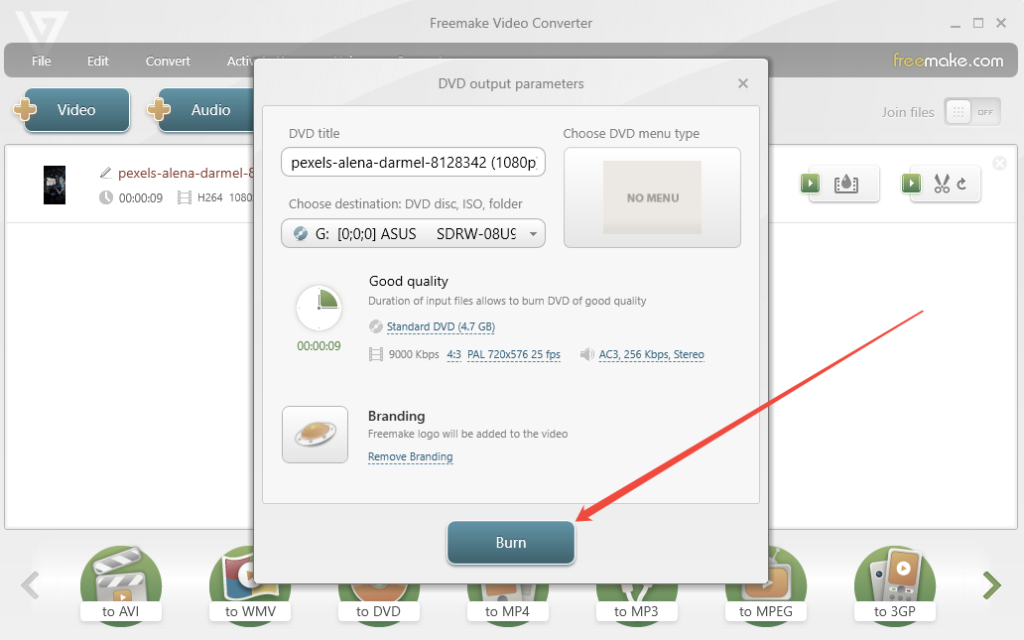
Step 4. Click the “Burn” button in the lower-right corner to start creating your DVD. That’s all.

Now that we’ve analyzed all the options, here is our final, clear comparison table on these 3 methods to convert M2TS to DVD:
| Option | Safety | Video Quality | Menu Features | Recommended For |
| TopBurn AI | ⭐⭐⭐⭐ | ⭐⭐⭐⭐ | Rich | Collectors seeking perfect video quality |
| Freemake Video Converter | ⭐⭐⭐⭐ | ⭐⭐ | Basic | Budget-conscious beginners |
| Online Converter (Aconvert) | ⭐ | ⭐⭐⭐ | None | Users in urgent need of a quick conversion |
If keeping the highest quality of your precious recordings is important, TopBurn AI is hands-down the best choice - offering lossless video quality, fast processing, and excellent compatibility with all DVD players. For users who only need simple format conversion, Freemake Video Converter is a reliable alternative without a steep learning curve.
Avoid third-party online converters unless you are fully aware of the potential privacy risks and can tolerate occasional upload or conversion failures.
That’s all about answers to the question, “How to convert M2TS to DVD.” No matter what your requirements are for video quality or menu features, you can use TopBurn AI, the top intelligent DVD burning tool, to burn M2TS videos from Sony, Panasonic, Canon, and other HD devices directly to a disc. But if you don’t want to install professional software, you can also use free video converters or online conversion tools instead.