Multimedia Tools
Video Tools
Audio Tools

Image tools
Record and Edit Porfessional Videos on Mac
Windows Desktop Screen Recording Software
Easy and Fast Way to Compress Video and GIF
Screen Mirroring App for iPhone/Android/PC/Pad
All-in-one video toolkit that supports converting over 1000+ formats
Portable audio format converter, which supports common audio format conversion, multiple audio merging, audio compression, audio segmentation, and one click batch conversion of audio formats
Cut, copy, paste, insert audio, add effects and other editing functions, which can easily re edit the recorded audio files and make ringtones, adding a unique personality to your life.
Karaoke Maker and Vocal Extractor on Mac
Extract vocals and instrumentals from any audio and video track with the latest AI technology.
Best Voice Recording Software for All Windows Users
Convert Audio/Video to MP3/WAV/FLAC/OGG

Utilities
Office Utilities
Simple and powerful office solution for file compression, extraction, transferring, and sharing. Easily to process multiple files in seconds!
A powerful, simple and easy to operate PDF to word converter, which supports the conversion between PDF documents and multiple formats such as doc, ppt, pictures and txt documents; The software has the functions of fast conversion, batch conversion, high-quality identification, etc
Burn music, video, and data discs in one-click
Fast Way to Reduce Your File Size
The best and perfect tool to convert various ebook files with ease.
Convert Videos, Audios, Images, PDFs, and Word with Ease
Seamless Conversion for PDF to JPG & JPG to PDF
Shrink size of PDFs, images, and videos without losing quality
Extract & Manage & Compress Files in Seconds
System & Recovery
{{ postData.top_advertising_product.g_name }}
Digitizing your DVD collection for Plex is useful since it allows you to stream your media anywhere and protects your physical discs from damage. However, ripping DVDs without quality loss can be more difficult for beginners. Can you rip DVDs for Plex while preserving the original quality? Well, this article explores this topic and shares the 3 best solutions. Let’s read on.
No, Plex cannot play physical DVDs directly, and there is no built-in “disc playback” feature that allows streaming content from a DVD drive or ISO image. Instead, ripping DVDs into digital files provides a workable solution, allowing you to keep the original quality and store them on your hard drive for Plex to recognize and play.
Now that you know physical DVDs need to be ripped into digital files, let’s get specific. Below is a list of the best video formats for Plex in 2026, ranked by their strengths and ideal use cases.
Some formats excel at preserving lossless quality, others are better for multi-device streaming, and some stand out for storage efficiency or compression. The table below summarizes their video quality, compatibility, direct playback potential, and transcoding difficulty.
| Format | Video Quality | Compatibility | Best for | Direct Playback | Compression Efficiency |
| MKV (H.264) | ⭐⭐⭐⭐⭐ | ⭐⭐⭐⭐ | Movie collections, multi-audio/subtitle packaging, home theater | ✅ Well supported | ⭐⭐⭐⭐ |
| MP4 (H.264) | ⭐⭐⭐⭐ | ⭐⭐⭐⭐⭐ | Mobile devices, web playback, and wide sharing | ✅ Almost universal | ⭐⭐⭐⭐⭐ |
| HEVC (H.265) | ⭐⭐⭐⭐⭐ | ⭐⭐⭐ | 4K content, hard drive space saving, and high compression needs | ⚠️ Requires hardware decoding | ⭐⭐⭐ |
| AVI | ⭐⭐⭐ | ⭐⭐⭐ | Legacy device compatibility, low-resolution content | ❌ Likely triggers transcoding | ⭐⭐ |
| MOV | ⭐⭐⭐⭐ | ⭐⭐⭐ | Apple ecosystem, video editing materials | ⚠️ Partially restricted | ⭐⭐⭐ |
There are quite a few ways to ensure perfect and high-definition quality when importing DVDs into Plex. The process should avoid any loss of detail and fully preserve the disc’s original audio-visual experience. So, here are the 4 best ways to rip DVDs while keeping the original quality intact:
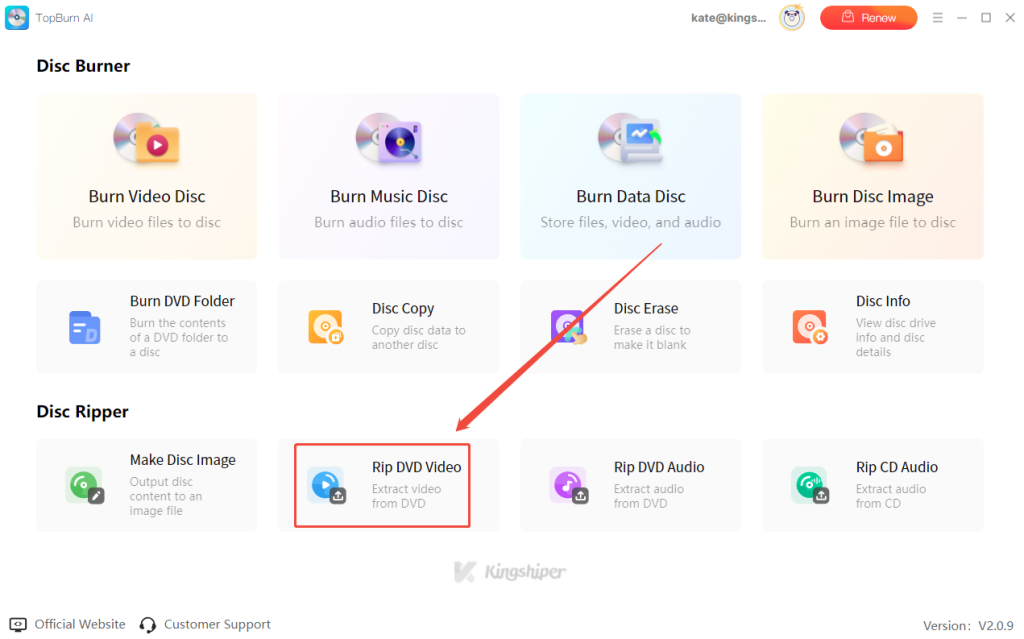
One of the most efficient ways to rip DVDs into Plex on Windows is to use a reliable AI-powered DVD and CD ripper. TopBurn AI is a DVD burning and ripping software that you can completely trust. TopBurn AI can intelligently recognize the content on your disc and extract any movie or TV episode without losing quality. It also excels at batch processing, allowing you to convert entire seasons at once. It is your best option for building a high-quality Plex media library.
Features of TopBurn AI:
How to Rip DVDs with TopBurn AI:
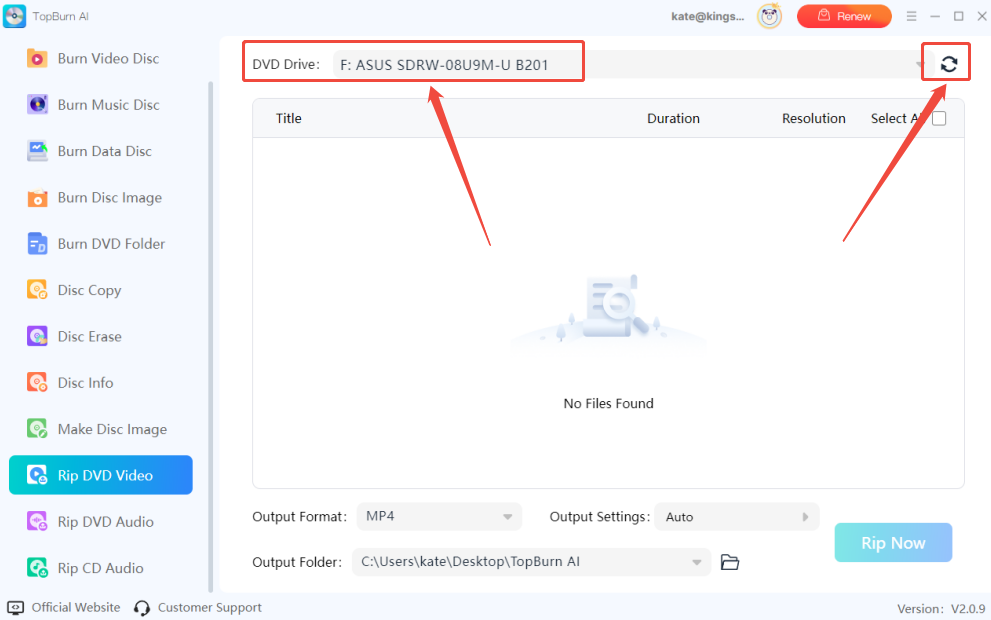
Step 1. Insert your DVD into the drive, launch TopBurn AI, and click “RIP DVD Video”.

Step 2. Select your DVD drive under DVD Drive. If it’s not recognized, click the “Refresh” icon.

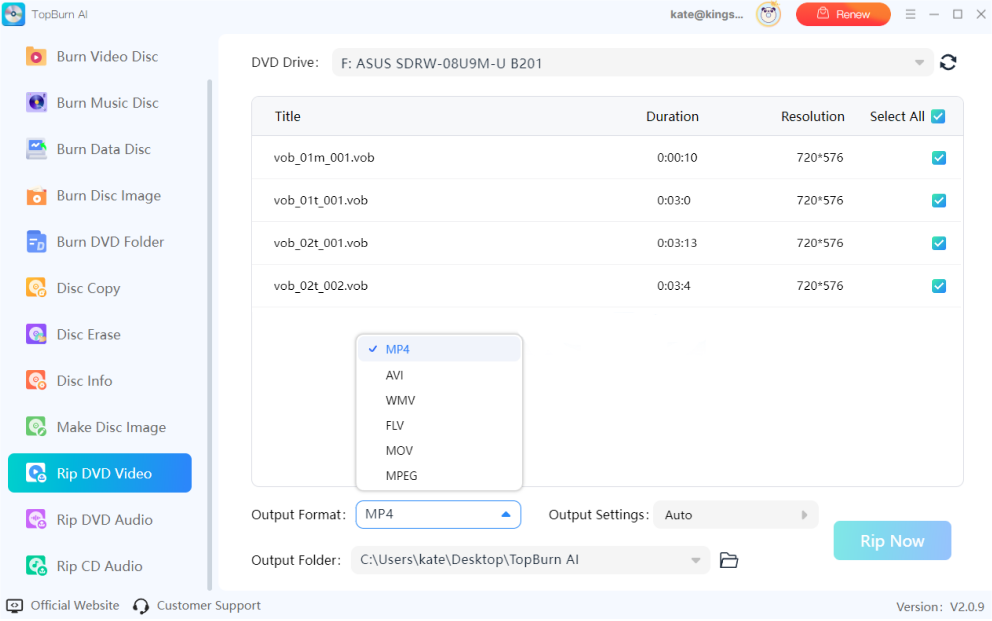
Step 3. Click “Output Format” to choose your preferred format; MP4 is recommended. Then customize the “Output Settings”, including resolution and frame rate.

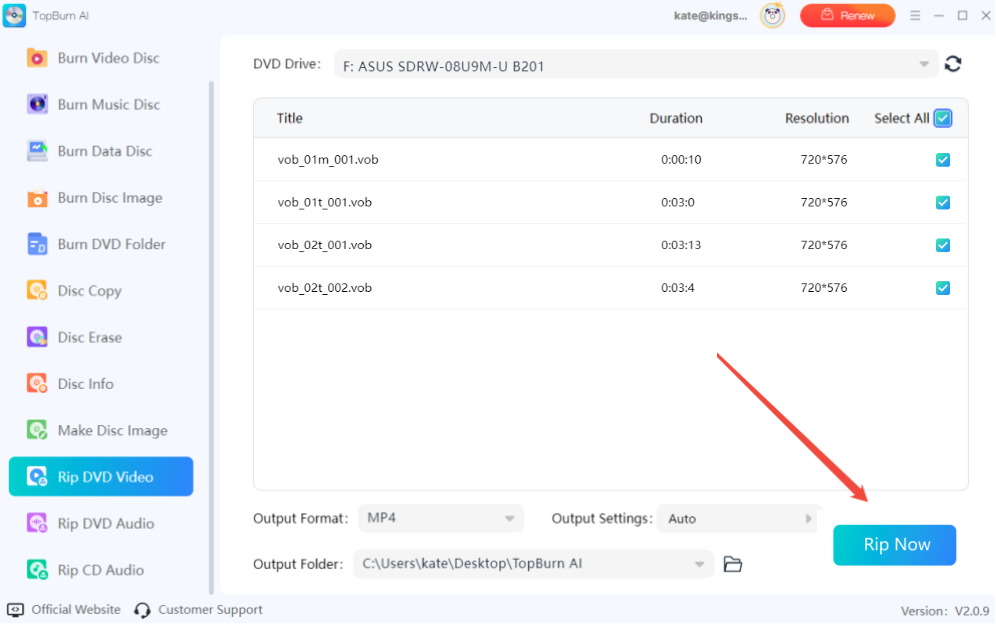
Step 4. Once settings are ready, click Rip Now. The software will automatically parse and convert your DVD.


Another way to rip DVDs is by using an open-source video transcoder. Without paying anything, you can convert DVD content into Plex digital files. This method is suitable for users on a budget or those who prefer a clean, ad-free experience. The software we recommend is HandBrake. It’s a free, open-source video processing tool that is powerful and easy to use. Check out the detailed steps below.
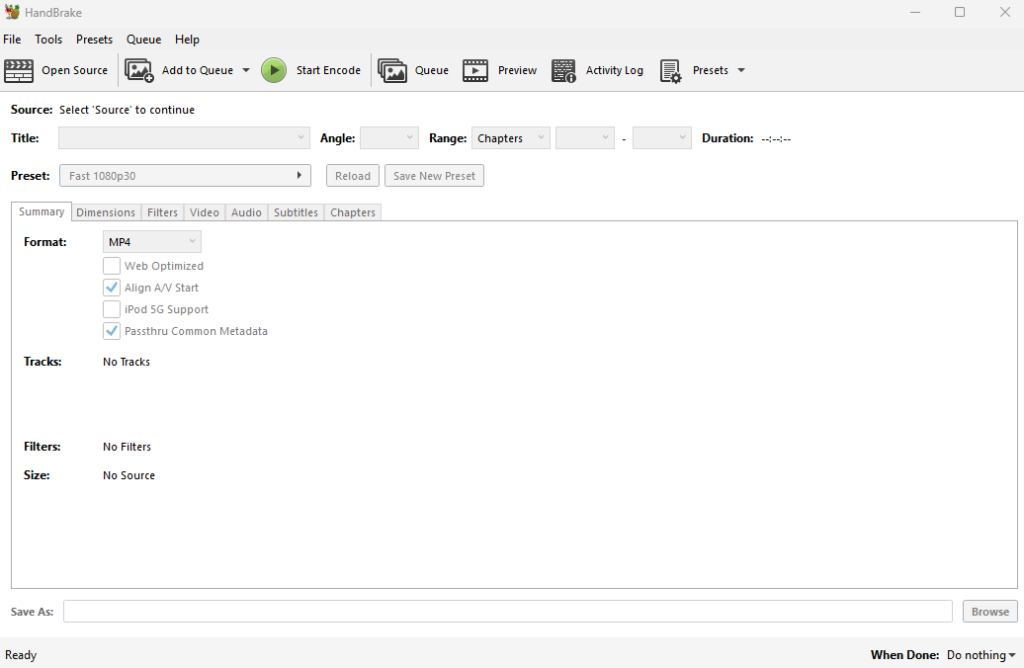
Step 1. Download and launch HandBrake on your computer.
Step 2. Insert your DVD, select your DVD drive as the source in the left panel, wait for the scan to complete, and then choose the main movie title you want to rip.

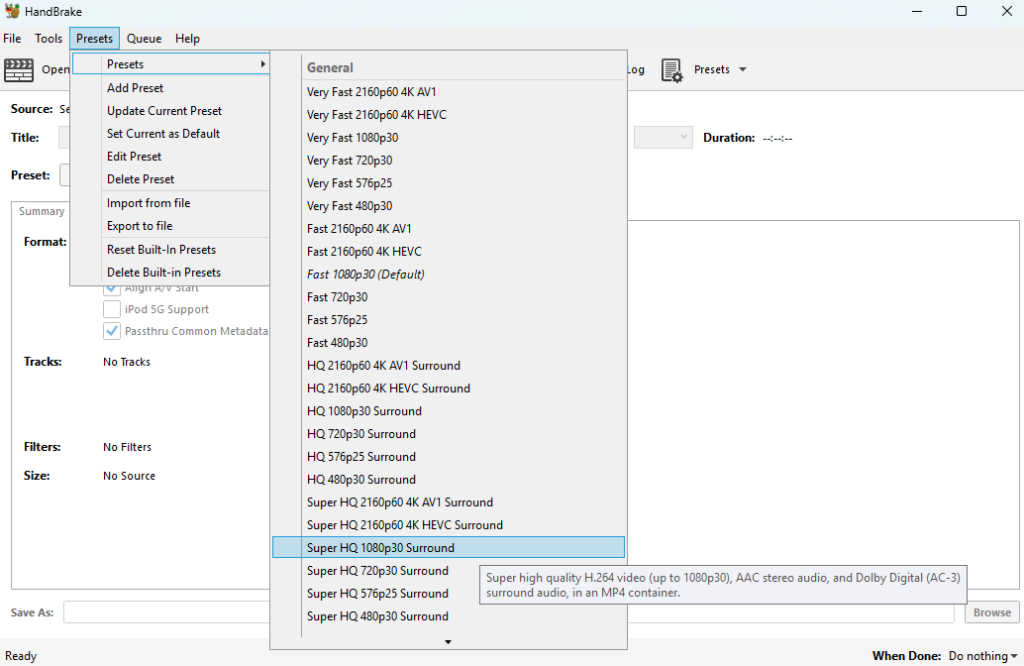
Step 3. In the presets panel on the right, select “HQ 1080p30 Surround” or another Plex-compatible preset. Set your output folder, then click “Start Encode” to begin converting and saving the video to your PC or Mac.


If you want to rip DVDs without losing any quality, there is another method using a powerful DVD ripping tool. MakeMKV is a popular free software designed to extract original data from DVDs and Blu-rays. It is generally considered safe when downloaded from the official website or trusted tech forums. Unlike HandBrake, it supports lossless processing and preserves all audio tracks and subtitles. If you are looking for a way to create a truly authentic media library backup, it is a highly efficient tool.
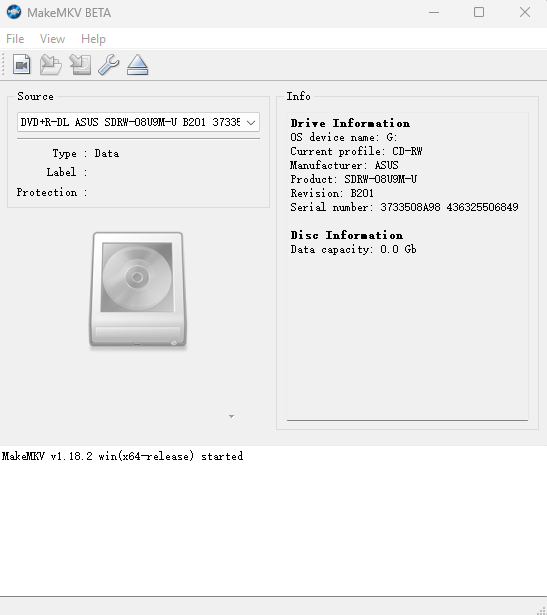
Step 1. Install MakeMKV on your computer and insert the DVD you want to rip.
Step 2. Open MakeMKV and click the large drive icon to scan the disc structure.

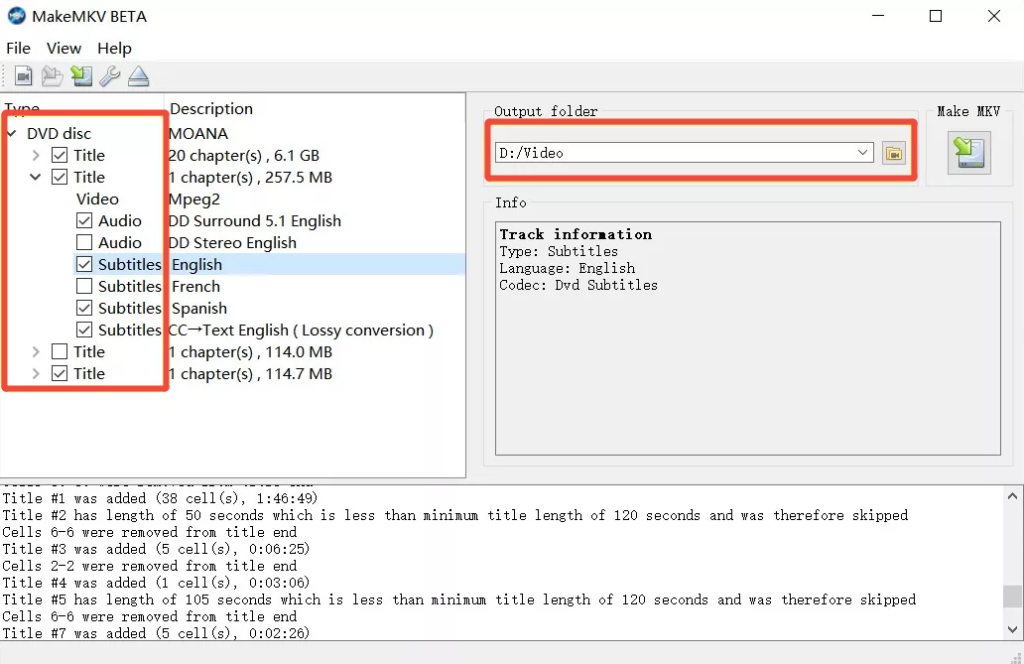
Step 3. In the expanded tree view, check the main movie, audio tracks, and subtitles you want to keep.
Step 4. Choose your output folder, then click the “Make MKV” button to start extracting.


Here are general steps to organize ripped DVDs for Plex.
Step 1. Create a dedicated folder to store all your ripped DVD videos, such as “Movies” or “TV Shows.”
Step 2. Sort the videos by type or series. For TV shows, organize them by season (Season 1, Season 2, etc.).
Step 3. Name each video file following Plex’s recommended conventions, e.g., Movie Name (Year).mp4 for movies and Show Name - S01E01 - Episode Name.mkv for TV shows.
Step 4. Ensure the video files’ audio tracks and subtitles are clear and match the file names and Plex library settings.
Step 5. Add the organized folders to your Plex media library, run a scan, and verify that all content is correctly recognized and categorized.
This article gives you detailed ways to rip DVDs into Plex without losing quality and how to use this method for seamless cross-device streaming, making it easier to manage your collection and improve your viewing experience. We also list some encryption issues you might encounter when using open-source transcoding software and how to fix them. For a faster and smarter DVD ripping experience, try TopBurn AI, which is comprehensive, intelligent, and also supports disc burning.
Keep reading to get more about this topic.
MP4 with H.264 video codec and AAC audio codec is the most compatible format for Plex.
Legal status varies by country. Generally, ripping for personal use may be allowed under fair use, but circumventing copy protection can be illegal.
Apps like TopBurn AI are the best choice for ripping DVDs, as they are specially designed for Plex and similar media platforms. They can quickly process discs and export video files with excellent compatibility.